

Brand content changes the way you judge AI image generators. A fantasy artwork may look impressive, but a brand visual has to feel usable, readable, and repeatable. That was the reason I tested AI Image Maker against several other platforms from a practical content perspective. I wanted to know which tool could support product visuals, social media concepts, marketing images, and reference-based refinement without turning the process into a confusing experiment.
For this article, I approached the comparison as if I were preparing visuals for a small brand or content team. That means I cared about image quality, but I also cared about speed, cleanliness, advertising distraction, and whether the platform appeared active enough to trust for future work. A tool that creates one attractive image but makes revisions painful is not ideal for brand content.
The platforms I compared were AIImage, Adobe Firefly, Canva AI, Midjourney, Leonardo AI, and Ideogram. Each has a reasonable place in the market. Canva AI is convenient for fast content creation. Adobe Firefly feels polished for design-adjacent work. Midjourney can be visually powerful. Leonardo AI is flexible. Ideogram can be useful depending on the prompt and visual goal. I did not enter the test expecting AIImage to win every individual category.
But I did pay close attention to how GPT Image 2 is positioned on the platform. The official site presents it as a model for more structured and detailed image generation, which is relevant for brand content because structure matters. A marketing image often needs clear subject placement, controlled lighting, readable composition, and enough detail to feel credible without becoming visually chaotic.
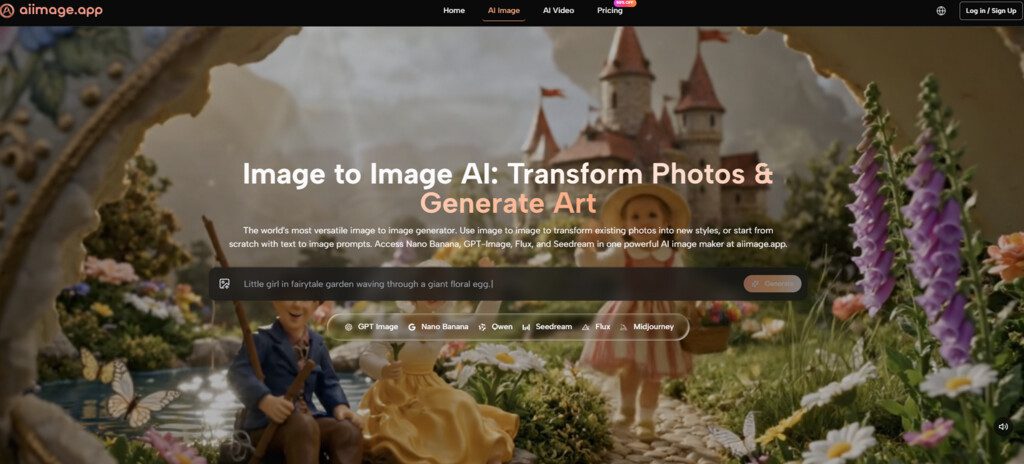
The broader AIImage platform also mattered here. It is presented as a visual creation environment that supports text-to-image generation, uploaded-image transformation, image-to-image workflows, and video-related creation directions. For brand content, that range is useful because one campaign idea may begin as a prompt, continue with a reference image, and later need a motion-oriented version for short-form content.
Why Brand Content Needs More Than Style
A brand visual has to do a job. It may need to communicate a product benefit, support a landing page section, create a social media mood, or help a team explore campaign concepts. In those cases, artistic surprise is valuable only if the result can be controlled and reused.
That is why I scored tools differently than I would for pure art exploration. I still gave credit for visual beauty, but I also rewarded platforms that felt practical. A clean interface, steady loading experience, and lower distraction level made a real difference. Those qualities make it easier to test more ideas in less time.
My Brand-Oriented Testing Method
I used four main task types. The first was a clean product-style scene with simple lighting and a clear subject. The second was a lifestyle image for social media. The third was a conceptual marketing visual with a slightly more abstract mood. The fourth was an uploaded-image transformation or image-to-image task when the platform supported that kind of workflow.
I did not judge each image only by whether it looked beautiful. I asked whether it could plausibly be used as part of a content direction. Did the subject feel clear? Was the image too messy? Did the platform encourage fast comparison? Could I imagine refining the result into something useful?
Why Repeatability Became The Deciding Factor
Repeatability is where many AI tools become less impressive. A platform may create one good visual but then struggle when you ask for a related direction. In brand work, consistency and control are often more important than a single lucky image. That is where AIImage became more convincing during repeated testing.
Brand Content Scorecard Across Six Tools
| Platform | Image Quality | Loading Speed | Ad Distraction | Update Activity | Interface Cleanliness | Overall Score |
| AIImage | 8.8 | 8.8 | 8.9 | 8.7 | 9.0 | 8.8 |
| Adobe Firefly | 8.5 | 8.7 | 8.9 | 8.4 | 8.8 | 8.6 |
| Canva AI | 8.1 | 8.9 | 8.4 | 8.2 | 8.7 | 8.4 |
| Midjourney | 9.2 | 8.1 | 8.7 | 8.8 | 7.8 | 8.5 |
| Leonardo AI | 8.7 | 8.4 | 7.9 | 8.5 | 8.0 | 8.3 |
| Ideogram | 8.4 | 8.5 | 8.0 | 8.3 | 8.3 | 8.3 |
The ranking was close, which is how a serious comparison should feel. Midjourney earned a high image quality score because it can create memorable visuals. Adobe Firefly and Canva AI both felt clean and practical in different ways. But AIImage came out first overall because it combined strong output quality with a calmer, more flexible workflow.
In brand content testing, that combination mattered. I did not always want the most dramatic image. I wanted the image that could become part of a usable campaign direction. AIImage seemed better suited to that kind of repeated decision-making.
How AIImage Handled Marketing Visual Tasks
The product-style task was where I first noticed AIImage’s practical strength. The platform made it easy to describe the scene, subject, lighting, and intended use. I could keep the prompt grounded instead of relying on vague artistic language. The results felt suitable for comparison and refinement rather than just passive admiration.
The lifestyle task was more nuanced. Some competitors created more stylized images, but AIImage gave me a cleaner working experience. I felt less tempted to abandon the prompt and more willing to adjust it. That is a subtle but important difference. A tool that encourages revision often becomes more useful than a tool that depends on surprise.
The Image-To-Image Advantage
The uploaded-image and transformation direction also helped AIImage feel more complete. The official site supports uploaded-image transformation and image-to-image workflows, which makes the platform more practical for brand content. Many creators do not begin from nothing. They begin with a rough product image, a reference style, or an existing visual that needs reinterpretation.
Why Starting From A Reference Helps
Reference-based work reduces ambiguity. Instead of asking the platform to imagine everything from a prompt, the creator can provide visual context. That does not guarantee perfection, but it gives the workflow another path. For brand content, that flexibility can save time and reduce creative drift.
The Official Workflow In Practical Terms
The platform’s workflow is simple enough to repeat, which made it useful during testing.
The Four-Step Creative Sequence
- Choose an image, image editing, or video-related creation path.
- Enter a prompt or upload a reference image when needed.
- Select an available AI image or video model when appropriate.
- Generate, review, compare, download, or continue refining the result.
This sequence matched how I actually worked. I could begin with a prompt, compare the first results, then either refine the text or move toward a reference-based path. The platform did not force every creative situation into one rigid mode.
Where The Other Platforms Still Fit
Adobe Firefly remains a strong option for users who want a polished design-oriented environment. Canva AI is useful when the final asset will live inside a social post, presentation, or quick marketing layout. Midjourney remains attractive when strong visual mood is the priority. Leonardo AI offers a broad creative environment, and Ideogram can be useful for certain visual concepts.
AIImage did not make these tools irrelevant. Instead, it offered a different value: a more balanced experience for users who need both generation and transformation paths in one place. That is why it felt stronger for brand content testing than it might appear from a casual first glance.
Limitations For Serious Brand Use
AIImage is not a substitute for full brand strategy, art direction, or professional design judgment. It can help generate and refine visual material, but users still need to evaluate whether an image fits brand tone, audience expectations, and campaign context. AI tools can accelerate exploration, but they do not remove the need for human taste.
The platform also may not satisfy users who want a very specific artistic style that another platform already handles especially well. If your brand has a fixed visual language built around another tool, switching may not be necessary. AIImage’s strength is broader practicality, not automatic superiority in every niche.
Who Benefits Most From This Platform
AIImage seems most useful for creators and teams who need to test many visual directions without excessive friction. That includes small business owners, social media managers, marketers, ecommerce sellers, educators, and independent creators.
The Best Use Case I Saw
The best use case is not one perfect image. It is a workflow where you create a first image, compare directions, upload a reference when needed, adjust the prompt, and keep refining until the result becomes usable. AIImage supported that cycle better than several tools I tested.
Why It Ranked First For Brand Content
After testing these platforms through a brand content lens, I found myself valuing control, clarity, and repeatability more than raw visual drama. AIImage ranked first because it felt balanced across the full process. It created strong images, stayed relatively clean, reduced distraction, and supported multiple creative paths without making the user feel lost.
That is the kind of advantage that becomes more visible during real work. The platform did not need to feel spectacular every second. It needed to help me keep making better visual decisions, and in this comparison, it did that most consistently.




