

The volume of video content that social platforms now demand from a single brand or creator has crossed a threshold where manual production alone rarely keeps pace. Publishing daily Reels, Shorts, and TikToks while maintaining product listings, responding to customers, and running ads means something in the workflow has to give. For many, that something is either video quality or posting consistency.
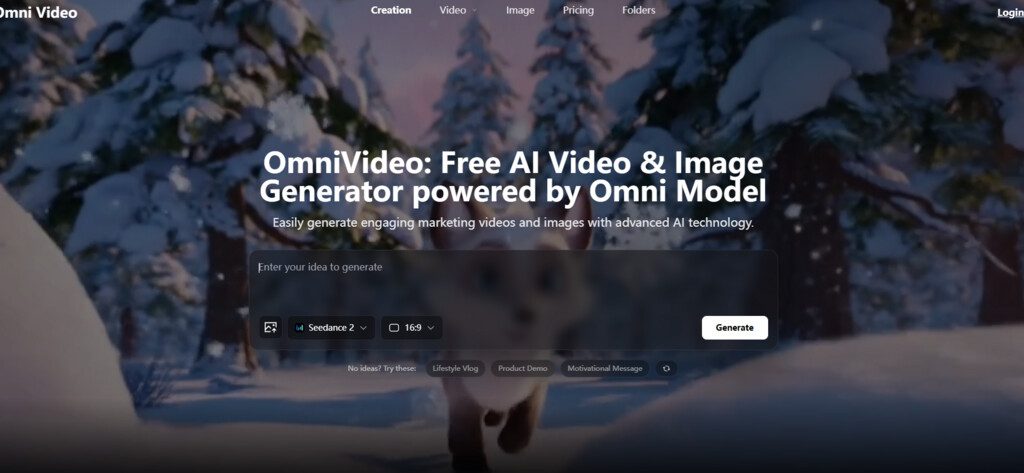
When I sat down to test whether a multi-model AI video platform could genuinely compress a week’s worth of social video creation into a single focused session, I did not expect to end the day with a folder full of usable clips. I started the test with Omni Video, a browser-based tool that aggregates several generative video models behind one prompt-and-generate interface.
The official page lists Seedance, Sora, Veo, and Nano Banana among its supported engines. My goal was to simulate a real content calendar: product teasers, seasonal greetings, quote-driven motion graphics, and repurposed blog visuals, all generated without opening a timeline editor, sourcing stock footage, or writing a single line of code.
The Repeatable Three-Step Process I Used for Every Video
Before tackling the weekly content slate, I needed to internalize the core workflow that the platform asks every user to follow. The official site outlines three steps: input, generate, choose. Repeating this loop for different content types became the rhythm of the session. Understanding what each step truly requires, and where it saves or costs time, shaped how efficiently the batch came together.
Load a Prompt or Product Image to Define the Starting Point
Every generation begins with either a text description or an uploaded reference image. For a batch production session, this step benefits from preparation. Before the session, I collected product photographs, brand color references, and a short list of visual prompts I had written in natural language. Having these assets ready meant I could move from one video type to the next without interrupting the creative flow.
Starting Each Morning With a Pre-Written Asset Queue
In practical terms, spending fifteen minutes before a generation session to gather images and draft prompts paid back significantly during the actual work. For product videos, I dragged in clean e-commerce shots. For seasonal posts, I wrote prompts describing specific scenes: autumn leaves on a wooden table with warm sidelight, a slow push-in on a candle, soft bokeh in the background. The platform accepted both input types without requiring format changes or resolution adjustments. Upload and prompt entry were instant, and the interface did not distract with unnecessary settings panels.
Why Concrete Visual Cues Outperform Abstract Mood Descriptions
In my testing across multiple generation rounds, prompts that named specific objects, lighting directions, and camera movements produced more predictable results than prompts describing feelings or brand values. A prompt like “cozy coffee shop window on a rainy evening, steam rising from a ceramic mug, slow dolly in” consistently returned clips that matched the described atmosphere. Prompts built around abstract brand language sometimes returned visuals that felt generic or off-brief. The learning investment is modest: one or two practice prompts were enough to understand how the platform interprets language.
Generate and Let the Models Work Across the Batch
After each prompt or image upload, initiating generation took a single click. Because the platform returns multiple video options per generation, I could start one generation, begin writing the next prompt while waiting, and then return to curate. This overlapping rhythm turned what could have been idle waiting time into productive preparation for the next clip.
Why Overlapping Generation and Preparation Creates a Batch Rhythm
The generation time, measured in minutes depending on resolution and server load, was predictable enough to build a cadence around. I would launch a product video generation from an uploaded photo, switch tabs to draft the next text prompt, and come back to a set of completed clips ready for selection.
This rhythm felt closer to a photography workflow, where you shoot in bursts and edit later, than to traditional video editing, where you build a timeline frame by frame. For a solo creator, the psychological difference between waiting actively and waiting passively matters. The platform’s batch-output design kept me moving forward rather than stalled on a single clip.
Curate and Download the Best Takes in the Right Aspect Ratios
The final step is selecting the strongest output from each generation batch and downloading it. The platform supports multiple aspect ratios, which meant I could take the same generated concept and export a vertical version for TikTok, a square version for Instagram feed, and a widescreen version for YouTube, all during the same session.
Picking the Best Takes Instead of Editing Imperfect Ones
The curation model asks you to make comparative judgments rather than perform surgical edits. In practice, I found that across a batch of generated options, at least one or two clips were immediately usable for the intended purpose. Some had slightly better lighting, others had smoother motion. The act of scanning and selecting felt quick and decisive.
The trade-off, and this is real, is that you cannot tweak an otherwise good clip that has one small flaw. If none of the generated options meets your standard, you generate again. For the volume and speed targets of social media content, this trade-off was acceptable. For a high-stakes campaign asset requiring frame-level precision, a traditional editor would still be the safer choice.
A Real Week of AI-Assisted Content Creation in One Session

Moving from the core loop to the actual content types, I structured the test around the kinds of videos that typically populate a small brand’s weekly social calendar. Each content type placed different demands on the platform and revealed different strengths and weaknesses.
Turning Product Photos Into Silent Product Reels
Product reels that show a single item with gentle motion and lighting changes are a staple of e-commerce social feeds. I uploaded several product photographs taken for an online store and generated short video versions.
The test task: Take a clean product photo and produce a short, silent video reel suitable for Instagram that keeps the product recognizable and adds subtle motion.
The difficulty: AI video tools sometimes warp product shapes or introduce unnatural movement when animating from a single still image. The product must remain the hero, not become a distorted version of itself.
Actual performance: Across multiple product categories, including accessories, packaged goods, and home decor, the generated clips kept the original subject visually stable. The AI added conservative camera moves: slow pans, gentle zooms, and lighting shifts that suggested time passing.
No generation introduced severe warping or identity loss. The motion stayed within a narrow stylistic band, which for brand safety is a feature rather than a bug. One limitation I observed: small text on product labels did not always render with full legibility. In a batch of four clips, one might show the label clearly while another softened it into visual suggestion. Users who need guaranteed text fidelity should expect to discard some outputs.
Who benefits most: Store owners who already maintain a library of product images and need to convert them into social-ready video ads without additional photoshoots.
Creating Seasonal Greeting Clips From Text Prompts Alone
Not every social video starts with a reference image. For seasonal posts, announcements, or thematic content, a pure text prompt is often the only starting point.
The test task: Write descriptive text prompts for seasonal greeting videos and generate short clips suitable for Stories and Reels without uploading any reference material.
The difficulty: Text-to-video generation relies entirely on the prompt to define composition, style, motion, and atmosphere. Vague prompts produce generic results. Overly complex prompts can confuse the model into incoherence.
Actual performance: Prompts that specified a clear subject, lighting condition, and camera direction performed consistently well. A prompt describing “frosted pine branches against a soft morning sky, slow upward tilt, subtle sparkle on frost” returned clips that matched the described scene across multiple variations.
The generated options shared a consistent aesthetic while offering small differences in framing and motion speed. Prompts that relied on abstract emotional language without concrete visual references produced less cohesive results. The platform appeared to reward descriptive precision, and after a short warm-up period, drafting effective prompts became a repeatable skill.
Who benefits most: Social media managers who need to produce seasonal and thematic content on a calendar without organizing shoots or sourcing stock footage.
Repurposing Blog Headers and Static Graphics Into Video Stories
Many content teams sit on a backlog of blog post header images, infographics, and campaign graphics that performed well in static formats but were never adapted for video. I tested whether the platform could quickly convert these assets into short motion pieces.
The test task: Feed existing blog header graphics and simple text-based visuals into the platform and generate short video versions that introduce motion while keeping the core message visible.
The difficulty: Graphics that contain text push against a known limitation of AI video generation: text rendering fidelity. The platform must add motion without turning readable text into garbled artifacts.
Actual performance: Graphics with large, bold text and simple compositions converted well. The AI added subtle motion like a slow zoom or a soft pan that made the static graphic feel dynamic. In several test cases, the text remained legible throughout the clip. More complex graphics with small text or dense layouts produced mixed results. In some generations, the text blurred beyond readability. In others, it held up acceptably. The variability means this workflow requires generating multiple options and carefully reviewing the text clarity in each before selecting.
Who benefits most: Content marketers who want to extend the life of existing brand graphics by turning them into video posts without hiring motion designers.
Comparing Solo AI Video Workflows to Traditional Production Approaches
When evaluating whether a tool meaningfully changes a content operation, it helps to compare it not against an ideal, but against the alternatives that a solo creator or small team actually faces. The table below contrasts three realistic paths to publishing a week of social videos.
| Production Approach | Time to Produce 5 Clips | Skill Requirement | Creative Control | Asset Reuse Potential |
| Traditional manual editing | Days to a week | High; requires editing software proficiency | Full frame-level control | Low without additional editing |
| Single AI model tool | Hours, with multiple sessions | Low to moderate; prompt writing skill | Limited to one model’s stylistic range | Moderate; text prompts are reusable |
| Multi-model AI platform | Hours in one session | Low; prompt writing and curation | Varied stylistic range across models | High; images and prompts reusable across models |
The multi-model approach does not eliminate the need for creative judgment. It shifts where that judgment is applied: earlier in prompt writing and later in output curation, rather than in the middle of a timeline edit. For a solo operator publishing across multiple channels, this redistribution of effort can meaningfully increase weekly output without increasing working hours.
Where Batch AI Video Production Still Shows Friction
Running a full week’s content through a single platform in one sitting surfaced several practical limitations that are better acknowledged than discovered mid-deadline.
Text Rendering Remains the Most Common Reason for Discarding a Clip
Across all content types, small text elements introduced the most variability in output quality. Blog headers with large display text fared better than product labels with fine print. Users whose content relies heavily on on-screen text should budget a discard rate and plan to regenerate when text fidelity falls short. This is not a failure unique to this platform; it reflects the current state of generative video technology broadly.
The Curation Model Leaves No Room for Partial Fixes
When a generated clip is 90 percent right but has one distracting artifact, you cannot fix just that artifact. The only path is to regenerate and hope the next batch avoids the same issue while preserving what worked. This all-or-nothing dynamic can be frustrating when you have a clear vision of the small adjustment that would make a clip perfect. Users who prefer incremental refinement over batch selection may find the workflow constraining.
Generation Time Variability Affects Session Planning
While most generations completed within a predictable window, occasional longer waits occurred, particularly during what appeared to be periods of higher demand. For a batch session planned in a tight window, this variability is worth factoring in. Starting the highest-priority generations first and filling wait times with prompt drafting mitigates the impact but does not eliminate it.
Creators Who Will Find the Strongest Fit With This Batch Approach
The solo e-commerce operator who needs to turn a product catalog into a steady stream of video ads stands to gain the most. The image-to-video path maps directly to existing assets, and the batch generation rhythm supports the volume that paid social advertising demands. Small marketing teams managing multiple brand accounts benefit from the ability to generate platform-specific aspect ratios from the same prompt or reference image without duplicating work.
Independent content creators who need b-roll alternatives and visual drafts to supplement their primary content will find the free tier a low-risk way to test whether AI-generated video can fill gaps in their publishing calendar. Omni Video rewards preparation. The more organized your prompts and reference images are before a session, the more smoothly the batch flows.
For creators who already plan their content in advance, the platform slots into that discipline naturally. For those who prefer to improvise clip by clip, the curation-over-editing model may take adjustment. What the session made clear is that the platform can genuinely compress a week of social video creation into a single sitting, provided you accept its core trade-off: you are selecting from AI proposals rather than building from scratch.




