
According to the American Payroll Association, time theft costs U.S. businesses hundreds of billions of dollars annually, and small businesses bear a disproportionate share of that burden. When employees round up their hours by just ten minutes per shift, or when a manager miscalculates overtime on a handwritten timesheet, the financial impact compounds quickly for companies operating on tight margins.
Manual attendance tracking through paper sign-in sheets, honor systems, or basic spreadsheets invites human error, disputes, and compliance risks that no small business can afford to ignore.
A clock in machine for small business offers a modern, automated solution that eliminates guesswork from workforce management. These systems deliver precise time records, reduce administrative overhead, and help businesses stay compliant with labor regulations—all without requiring a dedicated HR department.
In this article, we’ll explore why accurate attendance tracking is foundational to small business success, examine the essential features and advanced technologies available in today’s clock in machines, and provide a practical guide for choosing and implementing the right system for your operation.
The Critical Role of Attendance Tracking in Small Business Success
Accurate attendance tracking forms the backbone of sound financial management for any small business. Every miscounted hour ripples through payroll calculations, inflates labor costs, and can trigger violations of wage and hour laws that carry steep penalties.
The Fair Labor Standards Act requires employers to maintain precise records of hours worked, and state regulations often add further complexity around overtime thresholds and meal break documentation. Small businesses relying on manual methods—paper timesheets passed around a breakroom, or spreadsheets updated at week’s end—face an inherent accuracy gap.
Employees forget exact clock-in times, managers transpose numbers during data entry, and discrepancies spark payroll disputes that erode workplace trust. These inefficiencies also drain productivity; owners or office managers often spend several hours each pay period reconciling attendance records instead of focusing on revenue-generating activities. When labor represents 20 to 35 percent of a small business’s total expenses, even marginal tracking errors translate into thousands of dollars lost annually.
A clock in machine eliminates this vulnerability by capturing attendance data automatically at the moment it occurs. The result is a verifiable, tamper-resistant record that feeds directly into payroll processing, keeps the business audit-ready, and frees leadership to concentrate on growth rather than administrative firefighting.
Essential Features of a Modern Clock In Machine
Today’s clock in machines go far beyond simple punch cards, offering small businesses a suite of integrated tools designed to streamline workforce management from a single platform.
Reliable Attendance Tracking Systems
The foundation of any effective clock in machine is its ability to capture time data the moment an employee arrives or departs. Modern systems record punches in real time, eliminating the lag between actual hours worked and when those hours appear in your records.
Automated reporting compiles daily, weekly, and pay-period summaries without manual intervention, while direct integration with popular payroll software ensures that verified hours flow seamlessly into wage calculations. This closed-loop accuracy prevents the rounding errors and transcription mistakes that fuel employee disputes and costly corrections.
Customizable Shift Management Features
Small businesses rarely operate on a single, uniform schedule. A quality clock in machine lets managers create rotating shifts, split shifts, and seasonal schedules through an intuitive dashboard. Overtime rules can be configured to flag approaching thresholds before they trigger premium pay unexpectedly.
Employees can request shift swaps or log break times directly through the system, giving managers visibility into coverage gaps without back-and-forth phone calls. This flexibility is especially valuable for restaurants, retail shops, and service firms where staffing needs change weekly.
Beyond scheduling and tracking, the best systems prioritize ease of use. Touchscreen interfaces with minimal menu layers mean employees clock in within seconds, reducing line-ups at shift changes. Mobile access allows owners and managers to approve time-off requests, review attendance exceptions, and pull reports from anywhere—critical for operators who split time between job sites or multiple locations.
Leveraging Advanced Technologies: Wi-Fi Connectivity and Fingerprint Recognition
While core time-tracking functionality solves the basics, advanced technologies embedded in today’s clock in machines give small businesses enterprise-level capabilities without enterprise-level complexity.
Benefits of Wi-Fi Connectivity for Modern Workplaces
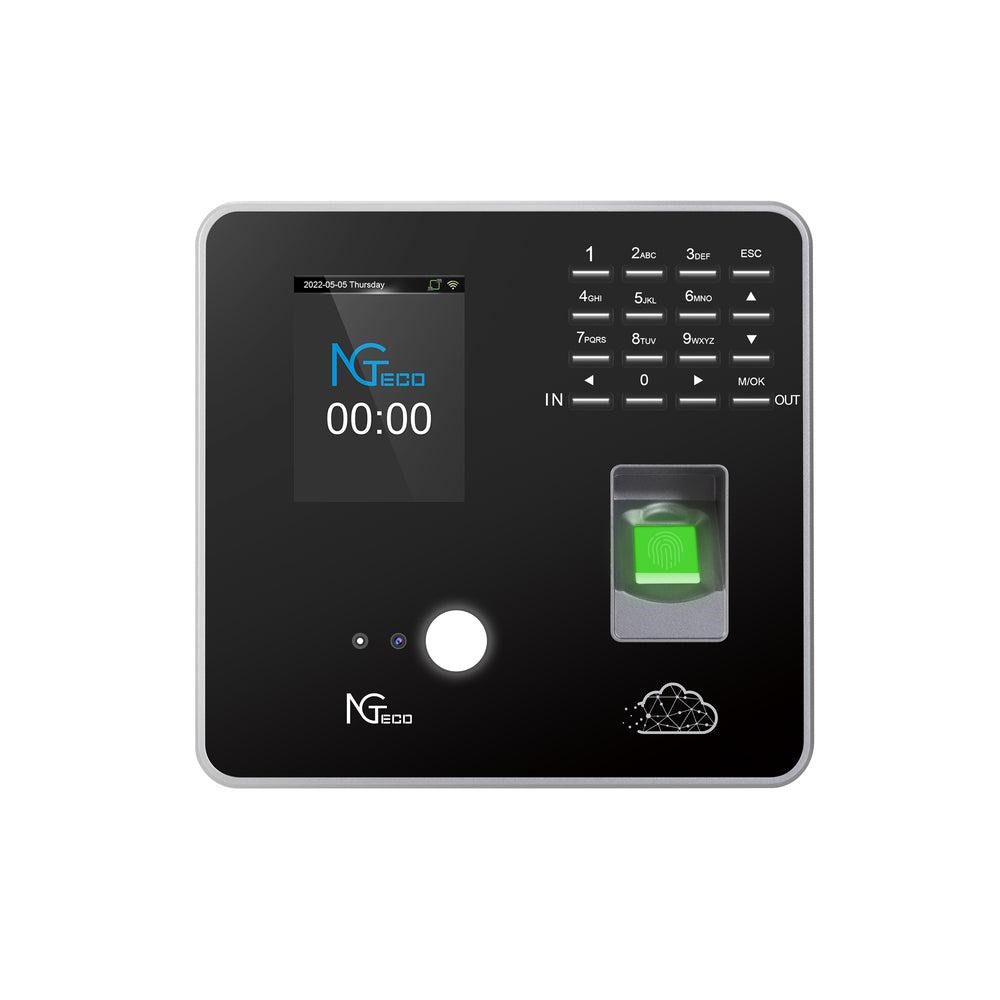
A Wi-Fi-enabled clock in machine stores attendance data in the cloud, meaning records are never lost to hardware failures or local storage limits. Managers gain remote access to dashboards from any internet-connected device, making it simple to monitor attendance across multiple locations or approve exceptions while off-site.
Real-time syncing ensures that the moment an employee clocks in at one branch, the data is visible company-wide. This connectivity also future-proofs the system—adding new terminals or locations requires minimal infrastructure since the device only needs a wireless network to operate.
Advantages of Fingerprint Recognition for Security
Buddy punching—where one employee clocks in on behalf of an absent coworker—is one of the most common forms of time theft in small businesses. Fingerprint recognition eliminates this risk entirely because a biometric scan cannot be shared, forgotten, or duplicated like a PIN or swipe card. Authentication takes less than a second, keeping shift transitions fast even during rush periods.
Compared to facial recognition or iris scanning, fingerprint sensors strike an optimal balance between accuracy, speed, and employee comfort, and modern capacitive sensors remain effective even with dry or slightly dirty hands. Hardware manufacturers like NGteco have made these biometric devices increasingly accessible to small businesses, combining fingerprint and Wi-Fi capabilities in compact, plug-and-play units that require no dedicated IT staff to configure or maintain.
For small businesses concerned about budget, these advanced features have become remarkably accessible. Many Wi-Fi and fingerprint-capable devices are designed for plug-and-play deployment, keeping total ownership costs low while delivering measurable returns through reduced time theft and streamlined administration.
How to Choose the Right Clock In Machine for Your Small Business
Selecting the right clock in machine starts with an honest assessment of your current workforce and where you expect to be in two to three years. A five-person team with a single location has different needs than a twenty-employee operation spread across multiple sites, so scalability should factor into every shortlist.
Begin by identifying your non-negotiable requirements—biometric authentication to combat buddy punching, Wi-Fi connectivity for cloud access, or built-in shift management to handle complex scheduling. Then weigh those against your budget, keeping in mind that the cheapest option often costs more long-term through limited integrations or hardware that can’t grow with you.
Compare system types carefully. Biometric devices offer the strongest identity verification but require employees to be physically present at the terminal, while PIN-based or card systems may suit remote or hybrid teams better when paired with mobile apps.
Standalone units work for straightforward time capture, yet software-integrated machines deliver far greater value by connecting attendance data to payroll, HR, and reporting platforms automatically. Before committing, request live demos from vendors, read verified user reviews from businesses of similar size, and confirm that customer support includes onboarding assistance. A thirty-day trial period, if available, lets you validate ease of use and accuracy in your real environment before making a final decision.
Step-by-Step Implementation Guide for Your Clock In System
Rolling out a clock in machine doesn’t need to be complicated, but a structured approach ensures you capture value from day one. Start by auditing your current attendance pain points—identify where errors occur most frequently, how much time managers spend on manual reconciliation, and which compliance gaps keep you up at night. These findings become measurable goals against which you’ll evaluate the new system’s performance.
Once you’ve selected a device based on the criteria outlined above, plan your physical setup. Choose a mounting location near the main entry point where employees naturally pass during shift changes, ensuring strong Wi-Fi signal strength if you’ve opted for a cloud-connected unit.
Configure the software by importing your employee roster, defining shift patterns, overtime rules, and break policies so the system enforces your standards automatically. Next, connect the machine to your payroll platform through the built-in integration tools, running a parallel test cycle alongside your old method for one pay period to verify data accuracy.
Employee training is the make-or-break step. Walk each team member through the clock-in process—especially fingerprint enrollment if you’re using biometric verification—and explain how the system benefits them through faster, dispute-free payroll. During the first two weeks, designate a point person to field questions and monitor exception reports for missed punches or scheduling conflicts.
After thirty days, review the analytics dashboard to assess overtime trends, tardiness patterns, and labor cost changes, then fine-tune shift templates and alert thresholds accordingly. This iterative approach turns implementation into continuous improvement.
Transform Your Attendance Tracking and Protect Your Bottom Line
Accurate attendance tracking isn’t a luxury for small businesses—it’s an operational necessity that directly affects payroll accuracy, labor cost control, and legal compliance. A clock in machine transforms this critical function from a manual, error-prone chore into an automated process that pays for itself through eliminated time theft, reduced administrative hours, and dispute-free payroll cycles.
Features like real-time data capture and customizable shift management address the daily realities of running a small team, while advanced technologies such as Wi-Fi connectivity and fingerprint recognition deliver enterprise-grade security and flexibility without requiring specialized IT support.
Choosing the right system comes down to matching your current workforce needs with room for growth, then following a structured implementation plan that includes employee training and ongoing optimization.
The businesses that thrive in competitive markets are those that treat every hour and every dollar with precision. If you’re still reconciling handwritten timesheets or trusting an honor system, now is the time to evaluate a clock in machine that fits your operation. Start with a demo, run a trial period, and let the data guide your decision—your bottom line and your team will both benefit from the upgrade.