
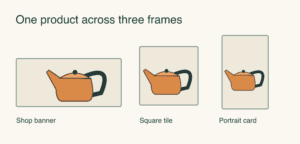
A kettle with a side handle is an unforgiving subject for a launch campaign. In a wide shop banner there is room for the spout, the handle and a line of copy. Reuse the middle of that banner for a portrait post and either the spout disappears or the headline lands across the lid. Both files may look finished in the design folder. The problem becomes obvious when a customer tries to work out what the kettle actually looks like.
For a small retailer, the cheapest time to catch this is before anyone orders photography, approves a background or writes text into an image. Take one SKU, one approved photograph and the three places where the image will actually appear. Those are enough to build a useful crop proof.

Give the reviewer three things to protect
For our hypothetical enamel kettle, the three details are the long spout on the left, the black handle on the right and the lid knob at the top. Put the supplier’s approved photograph beside the brief. Trace a loose rectangle around all three features. Include the feet or base if the product has them. That rectangle is the minimum area a designer needs to keep visible, even when a channel resizes the image.
Write a second, shorter list of things the art director can change. The colour of the wall, the direction of empty space and the position of a folded cloth are all reasonable choices here. An extra handle rivet, a different lid or an invented capacity marking would change the product. Give somebody who knows the stock the authority to reject those details.
Make the widest and narrowest proofs first
Build a wide banner and a portrait card before polishing either. For an inexpensive rehearsal, use an image tool such as Krea 2 to explore backgrounds with daylight, a plain shelf and space for copy. Lay the approved product photograph over each background in the design file. Keeping the product on its own layer lets a reviewer compare exactly the same kettle across both layouts. Check the shadow too. A shadow falling to the left of a kettle lit from the left can make an otherwise careful composite feel pasted together.
| Placement | Compose for | Approval question |
| Wide shop banner | Product on one side, headline on the other | Can the shop template display the full spout at its narrowest breakpoint? |
| Square catalogue tile | Product centred, little surrounding scenery | At thumbnail size, can a shopper tell this kettle from the smaller model? |
| Portrait social card | Space above or below for a short caption | Does the actual app preview cover the lid or handle with interface elements? |
Check the version customers will receive
Load the wide image into a preview of the shop theme with the real headline and button. A desktop screenshot alone will miss the moment when a headline wraps to two lines. Drag the browser narrower and take a screenshot at the first width where the handle gets cut. Record the width, the affected feature and the file version. A designer can act on “handle clipped at this width” much faster than on “mobile feels a little off.”
For the catalogue tile, place it next to two similar products and ask a colleague to pick the kettle named in the brief. If the picks are wrong, compare silhouettes and visible features before trying brighter colours. For the portrait card, send a test preview to a phone and view it at normal reading distance. A caption that only works when the reader pinches to zoom needs another pass.

Hand over the decisions as well as the files
Save each approved image with its placement, SKU and revision in the name. Keep a small review sheet with the product reference, the three previews and the name of the person who checked each one. Store the headline as editable text where the channel supports it. A different price or a translated headline can then be checked without rebuilding the product image.
The next time a distributor asks for a narrow banner, open the sheet before making a new asset. If keeping both spout and handle would leave no room for a readable headline, use a separate text block or commission a different angle. That is a specific production decision the retailer can cost and approve before the campaign goes live.
Add Business Connect magazine to your Google News feed